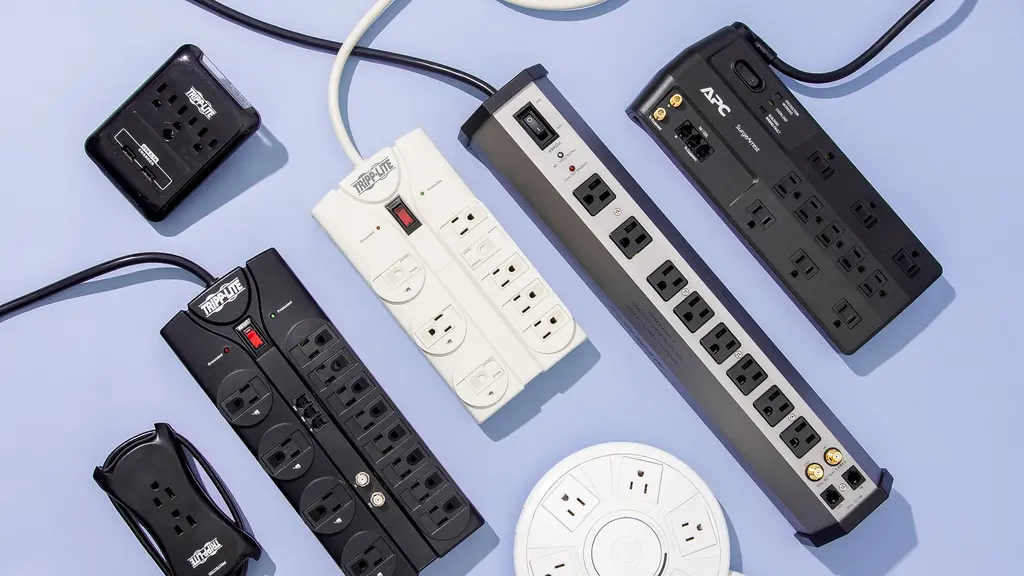
Modern offices depend on a wide range of electronic devices, including computers, monitors, printers, routers, chargers, desk lamps, and communication equipment. Because these devices are essential for daily productivity, protecting them from electrical problems should be a priority. A reliable Surge Protector Power Strip can provide an important layer of protection by helping reduce the impact of sudden voltage spikes and electrical surges. However, not every power strip offers the same level of protection, capacity, or convenience. Choosing the right model requires understanding your equipment, electrical needs, and the features that matter most.
Understanding the Purpose of a Surge Protector Power Strip
A standard power strip primarily provides additional outlets. It allows several devices to share one wall outlet, but it may not provide meaningful protection against electrical surges. A Surge Protector Power Strip, on the other hand, is designed with protective components that can help divert or limit excess voltage before it reaches connected equipment.
Electrical surges can occur for several reasons. Lightning activity, utility switching, power restoration, and certain electrical faults can produce temporary increases in voltage. Although a surge may last only a fraction of a second, sensitive electronic components can potentially be damaged by excessive voltage.
For an office environment, surge protection is especially useful because multiple expensive devices may be connected in the same workspace. Protecting these devices can help reduce the risk of unexpected equipment damage and interruptions to business operations.
Consider the Number of Devices You Need to Connect
One of the first factors to consider is the number of devices that need power. Office workstations can quickly require several outlets. A typical setup might include a desktop computer, two monitors, speakers, a printer, a desk lamp, and a phone or laptop charger.
Before purchasing a Surge Protector Power Strip, make a list of the equipment you expect to connect. Choose a model with enough outlets for your current setup while leaving a few unused outlets for future additions.
However, having more outlets does not automatically make a power strip better. A crowded power strip can encourage users to connect too many devices, potentially exceeding its electrical capacity. The total power requirements of connected equipment should always remain within the manufacturer’s stated limits.
Check the Joule Rating
The joule rating is an important specification when comparing surge protection products. It indicates how much surge energy the protective components are designed to absorb over time.
For office electronics, a higher joule rating can generally provide greater surge-handling capacity. Computers, monitors, networking equipment, and other sensitive electronics may benefit from a protector with a suitable rating rather than a basic low-capacity model.
The right rating depends on the type and value of the equipment being protected. Instead of choosing solely based on the number of outlets or appearance, examine the technical specifications and select a product designed for the level of protection your office requires.
Look at Clamping Voltage
Clamping voltage is another specification worth understanding. It refers to the voltage level at which the surge protector begins limiting excess voltage.
A suitable Surge Protector Power Strip should provide protection appropriate for the electrical environment in which it will be used. Lower clamping voltage can indicate that the protector responds at a lower voltage threshold, but specifications should always be considered together rather than evaluated in isolation.
For businesses, purchasing products from reputable manufacturers and checking their documented electrical ratings can make the selection process easier.
Pay Attention to USB Charging Options
Many modern offices use USB-powered devices every day. Smartphones, wireless accessories, tablets, headphones, and other small electronics may all require charging.
Some surge protector power strips include USB-A or USB-C charging ports, which can reduce the need for separate charging adapters. If your office relies heavily on USB-C devices, look for a model that supports appropriate USB-C power delivery rather than assuming every USB-C port provides the same charging performance.
USB charging can be a useful convenience, but it should not replace the primary evaluation of surge protection, electrical capacity, build quality, and safety features.
Choose the Right Cord Length
Cord length can make a significant difference in an office setup. A short cable may be sufficient for a desk positioned close to a wall outlet, while a longer cable may be necessary for conference tables, shared workstations, or equipment positioned farther away.
The goal is to select a cord long enough to reach the intended outlet without creating unnecessary slack. Avoid routing power cords across walking paths where they could become tripping hazards.
A well-designed Surge Protector Power Strip should complement the layout of the workspace rather than create additional cable-management problems.
Consider Safety Features
Safety should be a major consideration when selecting office power equipment. Look for features such as overload protection, circuit breakers, and clearly stated electrical ratings.
Some models also include indicators showing whether surge protection is active. This can be useful because protective components can wear out after absorbing significant surge energy. An indicator can help users recognize when the unit may need replacement.
It is also important to avoid connecting one power strip into another. This practice, sometimes called daisy-chaining, can increase the risk of overloading electrical circuits and should generally be avoided.
Match the Protector to Your Office Equipment
Different office devices have different power requirements. A basic workstation may require a relatively modest setup, while a professional workstation with multiple monitors, high-performance computing equipment, external storage, and specialized peripherals may demand more careful planning.
Networking equipment such as routers, switches, and modems can also be important to protect because a damaged network component can interrupt communication and internet access throughout an office.
For valuable equipment, consider whether additional protection such as a UPS is appropriate. A UPS can provide battery backup during power interruptions, while a surge protector primarily focuses on limiting damaging voltage spikes. These technologies serve different purposes and can sometimes be used together when properly configured.
Think About Build Quality and Design
Office equipment often remains connected for many hours each day, so durability matters. A well-built Surge Protector Power Strip should have sturdy construction, appropriately spaced outlets, and a power cord designed for its intended electrical load.
Outlet spacing is particularly useful when larger power adapters are involved. Closely spaced outlets can make it difficult to use every socket if several devices have bulky adapters.
A compact design may work well for an individual desk, while a larger unit with widely spaced outlets may be better for conference rooms, shared workstations, or equipment areas.
Avoid Choosing Based Only on Price
Price is important, but the cheapest option is not necessarily the best choice for valuable office equipment. A low-cost product may provide additional outlets without offering the level of protection or construction quality needed for sensitive electronics.
Instead, compare specifications, safety features, warranty information, electrical ratings, and manufacturer reputation. Paying somewhat more for a properly designed Surge Protector Power Strip can be reasonable when it is protecting computers and other equipment that may be expensive to replace.
Conclusion
Choosing the right Surge Protector Power Strip involves more than counting the number of available outlets. Office users should consider surge-handling capacity, electrical ratings, outlet configuration, USB charging capabilities, cord length, safety features, and overall build quality.
The best choice is one that matches the specific needs of the workspace without encouraging electrical overloading. By evaluating technical specifications and purchasing reliable equipment from reputable sources, businesses can create a safer and more organized power setup for their computers, monitors, networking devices, chargers, and other essential electronics. A carefully selected surge protector can therefore become a practical part of an office’s broader approach to equipment protection and electrical safety.

More Stories
Free Creator Tools: Essential Resources for Creating Engaging Digital Content
Exploring Industrial Drone Applications: 7 Core Uses, UAV Categories & Buying Tips
Picture Magnets for Home Decor, Celebrations, and Meaningful Memories