Remote access has become an essential part of modern business operations. Employees, contractors, administrators, and support teams often need to connect to company systems from different locations and devices. Managing these connections efficiently can become challenging when organizations have multiple users, servers, applications, and security requirements. This is where a Windows VPS RDS CAL setup can provide a practical approach to organizing remote desktop access.
A Windows VPS provides a virtual Windows-based server environment that can be accessed remotely over the internet. Remote Desktop Services (RDS) extends this capability by allowing multiple authorized users to access desktops or applications according to configured permissions and licensing requirements. Understanding how RDS Client Access Licenses (CALs) fit into this environment can help organizations build a more structured remote access system.
Understanding Windows VPS and Remote Desktop Services
A Windows VPS is a virtual private server running a Windows operating system. Unlike a traditional physical server, a VPS operates within a virtualized environment while providing dedicated resources such as processing power, memory, storage, and network access. Businesses can use Windows VPS environments for hosting applications, managing databases, running business tools, or providing remote workspaces.
Remote Desktop Services allows users to connect to Windows-based resources remotely. Instead of requiring employees to install every application on their local computers, organizations can host applications or desktop environments on a centralized server. Users can then access those resources through a remote connection.
This centralized model can simplify administration because software, configurations, and many security controls can be managed from the server rather than individually on every employee device.
What Is a Windows VPS RDS CAL?
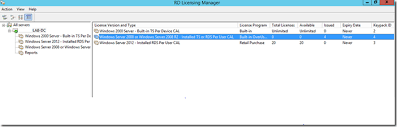
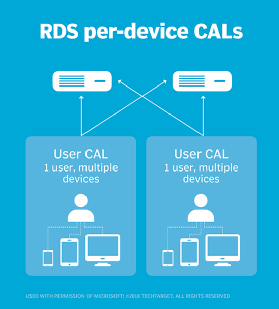
A Windows VPS RDS CAL refers to the licensing component associated with allowing users or devices to access Windows Remote Desktop Services. RDS CALs are generally available under user-based or device-based licensing models, depending on the organization’s requirements and licensing agreement.
The purpose of an RDS CAL is not simply to provide a remote connection. It forms part of Microsoft’s licensing framework for Remote Desktop Services. Organizations should therefore make sure that their Windows Server and RDS deployment is properly licensed and configured.
For businesses using remote access regularly, understanding the relationship between the Windows VPS, Windows Server, RDS roles, and CAL licensing can prevent confusion during deployment. It also helps administrators plan access as the number of remote users grows.
Centralized Remote Access Management
One of the biggest advantages of using a Windows VPS with properly configured RDS licensing is centralized management. Instead of maintaining separate remote access solutions for every employee, administrators can manage connections through a central server environment.
User accounts can be created, modified, disabled, or removed from a centralized location. Permissions can also be assigned according to job responsibilities. For example, an accounting employee may need access to financial applications, while a technical employee may require access to development or administrative tools.
Centralization makes these changes easier to manage. When an employee leaves the organization, administrators can disable the relevant account without having to modify multiple computers individually.
Supporting Remote and Hybrid Work
Remote and hybrid working arrangements have increased the importance of reliable remote access. Employees may work from offices, homes, coworking spaces, or while traveling. A centralized Windows VPS environment can give authorized users access to the same applications and resources without requiring the organization to duplicate infrastructure in multiple locations.
With RDS, users can connect to a remote Windows environment and work with centrally hosted applications. This can be particularly useful for businesses where important software requires a Windows environment or where consistent desktop configurations are important.
A Windows VPS RDS CAL strategy can therefore support flexible working while giving administrators a central point for controlling access.
Simplifying Software Administration
Managing software across dozens or hundreds of individual computers can consume significant IT resources. Updates, configuration changes, application installations, and troubleshooting may need to be repeated across multiple devices.
A centralized remote desktop environment can reduce some of this administrative workload. Applications hosted on the server can be updated centrally, allowing authorized users to work with a consistent environment.
For example, if a business updates an internal application, administrators may only need to manage the server-side installation rather than performing the same task on every remote employee’s computer. This does not eliminate endpoint management entirely, but it can make certain software administration tasks more efficient.
Improving User Access Control
Remote access must be carefully controlled because improperly configured systems can expose valuable business resources. RDS environments allow administrators to define which users are authorized to connect and what resources they can access.
Strong passwords, multi-factor authentication where supported, network-level security controls, least-privilege permissions, and account monitoring can strengthen a remote access strategy. Administrators should also avoid giving users unnecessary administrative privileges.
The licensing component should be considered alongside these security measures. A Windows VPS RDS CAL helps address licensing for Remote Desktop Services, while access permissions and security configurations determine how users interact with the environment.
Easier Scalability for Growing Teams
Businesses rarely remain the same size. A company that starts with a handful of remote workers may eventually need to support dozens or hundreds of users. A well-planned Windows VPS and RDS architecture can make this growth easier to manage.
Administrators can review current resource requirements, user numbers, and licensing needs before expanding the environment. Additional server resources or infrastructure may be introduced as demand increases.
RDS CAL planning is particularly important during growth because licensing requirements can change as more users or devices require remote access. Businesses should regularly review their Microsoft licensing arrangements instead of assuming that an existing configuration will automatically cover future expansion.
Reducing Complexity for IT Teams
IT departments often deal with many competing responsibilities, including device management, software deployment, security, backups, troubleshooting, and user support. A centralized remote desktop environment can reduce complexity by bringing certain workloads into one managed infrastructure.
When users experience application problems, administrators may be able to troubleshoot the centralized environment instead of investigating numerous independent installations. Standardized configurations can also make troubleshooting more predictable.
However, organizations should still maintain appropriate backups, monitoring, patch management, and disaster recovery procedures. Centralization improves management but also makes the server environment an important part of the organization’s infrastructure.
Planning a Reliable Windows VPS RDS Environment
Successful implementation requires more than purchasing a Windows VPS and enabling remote connections. Organizations should first determine how many users need access, what applications they will use, how much server capacity is required, and what security controls are appropriate.
Licensing should also be verified through legitimate Microsoft licensing channels or an authorized licensing provider. RDS CAL requirements can depend on the deployment and licensing model, so businesses should confirm the current licensing terms before implementation.
Network performance is another important consideration. Remote desktop sessions depend on stable connectivity, and applications that use substantial bandwidth may require additional planning. Server resources should also be monitored to ensure that simultaneous sessions do not overwhelm CPU, memory, or storage capacity.
The Long-Term Value of Centralized Remote Access
A well-designed remote access system can provide more than convenience. It can create a consistent working environment, simplify user administration, support flexible work arrangements, and make software management more centralized.
The combination of a Windows VPS, Remote Desktop Services, appropriate RDS CAL licensing, and sensible security policies can create a structured environment for organizations that depend on remote Windows access. The key is to treat licensing, security, performance, and user management as connected parts of the same strategy.
Final Thoughts
Managing remote access does not have to mean maintaining complicated systems across numerous individual computers. A properly configured Windows VPS RDS CAL environment can centralize remote desktop access, simplify administration, support distributed teams, and provide a scalable foundation for business applications.
Organizations should focus on legitimate licensing, appropriate user permissions, strong security practices, reliable infrastructure, and regular monitoring. When these elements are planned together, Remote Desktop Services can become a practical component of a modern remote access strategy rather than another source of IT complexity.


More Stories
How Digital Visibility Services Increase Traffic, Trust, and Customer Engagement
Best Use Cases of an AI Automation Platform for Digital Growth
Secure Web Gateway for Healthcare: HIPAA Considerations